Wireless Gaming Headset with Mic for PS5/PS4/PC – Practical Guide
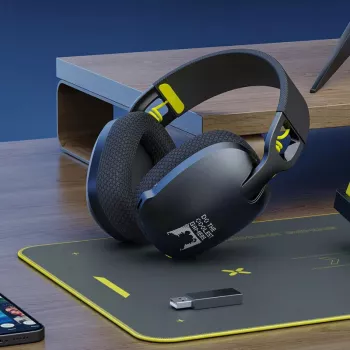
Wireless Gaming Headset with Mic for PS5/PS4/PC – What a 2.4GHz USB Setup Gets You
A wireless headset can make gaming sessions feel cleaner, faster, and more comfortable—especially when the connection stays stable and the mic keeps speech clear. A 2.4GHz USB gaming headset is built around one goal: deliver responsive audio and reliable chat without the extra lag that can show up with more “universal” wireless options. If you play on PS5, PS4, or PC, this style of headset is often the simplest way to get low-latency wireless sound with plug-and-play setup. For more guidance, see Guide To Finding The Best Gaming Headphones | Gae News Monitor.
Quick look: what this headset is built for
- 2.4GHz wireless connection via USB receiver for low-latency play on supported devices
- Designed for PS5/PS4 and PC setups that favor plug-and-play convenience
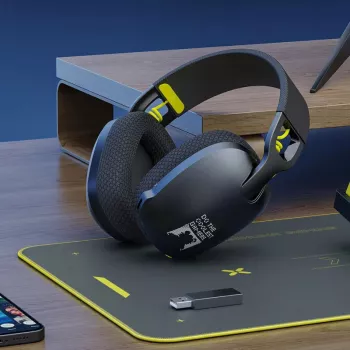
- Ergonomic, over-ear style aimed at longer sessions with less pressure and heat buildup
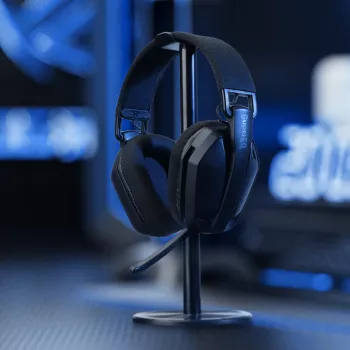
- Integrated or boom-style mic (depending on model configuration) intended for party chat and team comms
2.4GHz USB wireless vs Bluetooth vs wired
Not all “wireless” gaming audio behaves the same. A dedicated 2.4GHz link is typically tuned for responsiveness and consistency, while Bluetooth prioritizes broad device compatibility. Wired remains the simplest route to zero wireless variables, but it comes with its own day-to-day trade-offs. For further reading, see Wireless Gaming Headset SteelSeries Arctis 7 PC PS4 Over-Ear Black.
| Connection type | Typical latency feel | Best use case | Main trade-off |
|---|---|---|---|
| 2.4GHz USB receiver | Low | Competitive play, consoles/PC at a desk or couch | Usually requires a dongle; not always phone-friendly |
| Bluetooth | Medium to high (varies by device/codec) | Casual gaming, travel, phones/tablets | Potential delay and lower mic quality |
| 3.5mm / wired | Very low | Zero-latency play, no charging | Cable management and movement restriction |
Comfort and ergonomic fit for long sessions
Comfort can be the difference between “one more match” and pulling the headset off mid-raid. For over-ear designs, the fit comes down to weight distribution, clamp force, padding depth, and how well the cups seal without overheating.
- Look for a headband that distributes weight evenly to reduce hot spots on the crown
- Cushion depth matters: deeper ear pads can reduce ear-to-driver contact and improve comfort for glasses wearers
- A secure but gentle clamp helps maintain a consistent seal for bass and positional cues without fatigue
- Adjustability should accommodate different head sizes while keeping ear cups aligned with the ears
Audio performance for gaming: positioning, impact, and detail
Gaming audio isn’t only about big explosions—clarity in the midrange is what helps footsteps, reloads, and ability cues stand out. A headset tuned with controlled bass and clean mids tends to deliver more usable information in competitive play, while still sounding fun for story-driven titles.
- Positional cues (footsteps, reloads, ability tells) benefit from clear mids and controlled bass
- A balanced tuning helps keep dialogue and team callouts intelligible during loud effects
- Closed-back isolation can help focus in noisy rooms, but comfort and ventilation become more important
- For single-player titles, a fuller low end can improve immersion without masking directional detail
Microphone clarity for chat and teamwork
Clear comms reduce friction: fewer repeated callouts, fewer misunderstandings, and less fatigue during long sessions. If your headset uses a boom mic, a stable placement usually keeps your volume more consistent when you turn your head or lean back.
- Prioritize consistent voice pickup and reduced background noise for party chat and Discord-style calls
- Mic monitoring/sidetone (if available) helps prevent speaking too loudly when the game is intense
- Placement matters: a stable boom position tends to keep voice levels more consistent than a loose inline mic
- Test and tune input level in console/PC settings to avoid clipping or low volume
Wireless range, stability, and interference tips
Even solid wireless headsets can run into interference depending on your room layout. Simple placement changes often fix dropouts faster than any software tweak.
Compatibility and setup on PS5, PS4, and PC
- PS5/PS4: connect the 2.4GHz USB receiver, then confirm input/output device settings in the console audio menu (see PlayStation Support)
- PC: plug in the receiver and select the headset as the default output/input device in system sound settings (see Microsoft Windows Support)
- Chat mixing features may depend on platform support and headset design; confirm available toggles in the system UI
- If you use Discord on PC and your voice sounds off, review device selection and troubleshooting steps (see Discord Support)
Controls, battery habits, and everyday usability
Who this headset suits best
Shop in-stock picks
- Wireless Gaming Headset with Mic for PS5/PS4/PC – 2.4GHz USB, Ergonomic Fit ($56.82)
- Coding with Confidence in the Age of AI – Ultimate Digital Guide for Developers ($11.99)
- How to Use AI to Plan Family Activities | Digital Guide ($5.99)
FAQ
Does a 2.4GHz USB headset work on PS5 and PS4?
Many 2.4GHz headsets work by plugging the USB receiver into the console and then selecting the headset as the input/output device in the audio settings. Exact features (like chat mixing or sidetone) can vary by model and by console support.
Is 2.4GHz better than Bluetooth for gaming audio?
For real-time gameplay, a 2.4GHz USB connection is typically lower latency and more stable than Bluetooth. Bluetooth is more universal for phones and tablets, but it can introduce delay depending on the device and codec.
How can mic quality be improved on console or PC?
Position the mic closer to your mouth, set your input level to avoid clipping, and enable any noise reduction options your platform provides. It also helps to reduce background noise in the room and test your voice in party chat or system sound settings.





Leave a comment